Vista Disconnect From Network Share or UNC Path

Occasionally I’ll try to connect to a UNC share or network device and I’ll forget my proper username and password for the device (NAS, router, another box, etc.).  In the case of one of my NAS drives at home, it will let me guess three times what my credentials are, and then it will just connect me as whatever my last guess was, but at that point I’m basically attached as guest.  Once that happens, I can see the root of the drive in Windows Explorer, but I can’t get to any of the subfolders due to lack of permissions.
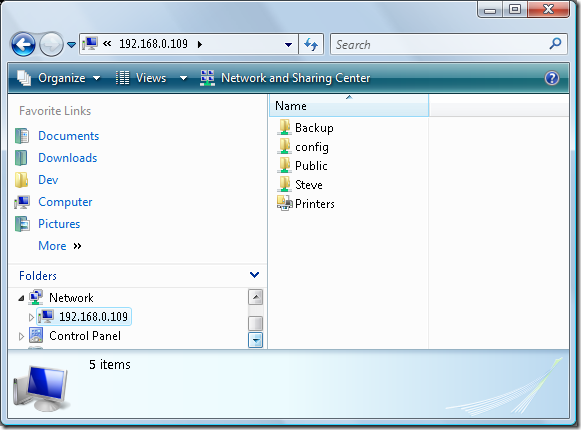
 image

If I try to reconnect,  it won’t let me.  If I try to map a new network drive, it tells me I can only have one connection open to this device.  If I right-click on the IP/sharename in Windows Explorer, there is no option to disconnect.  Vista fail.

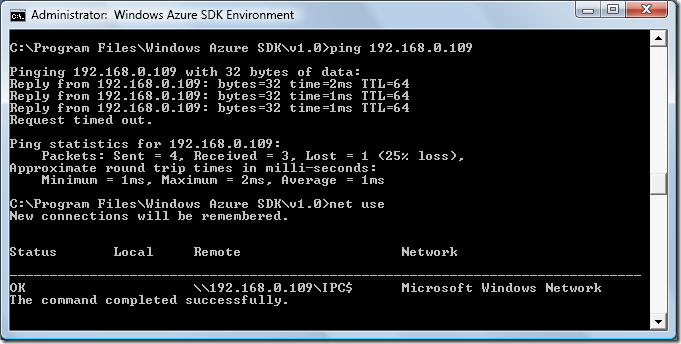
In order to reconnect (with the correct credentials, once remembered),  the only way I’ve found to disconnect without restarting (or at least logging out and back in) is via the command prompt, with the net use command.  In this case, if you type net use you might see something like this:
image

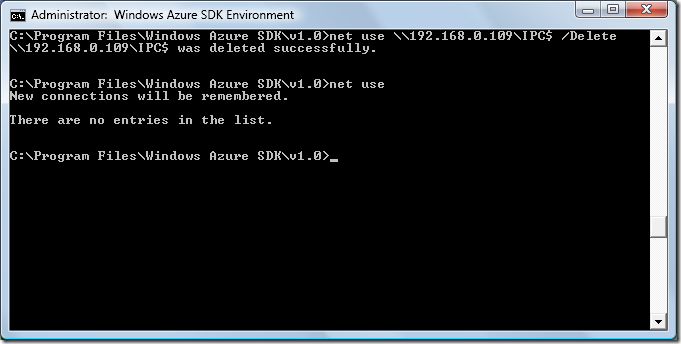
As you can see, I’m connected to a share via its IP address.  If you have multiple connections open, you should see all of them listed here.  To remove a connection, you simply specify its name and the /Delete flag along with the net use command:

net use \\192.168.0.109\IPC$ /Delete

Following this with simply:

net use

Should show that you no longer are connected to the resource, and you can try once more to attach to it (in Windows explorer, or via net use if you like – what I should do is script these so I don’t have to remember them…).

image

8 Comments

  • Dave said

    And this still happens in Win7; there's still no reconnect command in net use and explorer doesn't let you reconnect either. Pretty poor IMO.

  • TT said

    I sold my NAS device an bought more internal hard drives because of this "feature". Irritating.

  • MHarr said

    As a consultant that often works at 2-4 offices each week, reestablishing network connections is an issue for me. I solve it by having a vbscript file for each location, and
    running it when I get there. I have posted one of my scripts below as an example. Note that under Vista (and Win7), I have to run the script with elevated permissions, but using the excellent Elevation PowerToys from Michael
    Murgulo (http://technet.microsoft.com/en-us/magazine/2008.06.elevation.aspx), I just right-click on the .vbs file and select "Run as Administrator at Command
    Prompt".
    ------------------------------------------
    Dim WshShell, oExec
    Dim BtnCode
    Set WshShell = CreateObject("WScript.Shell")
    Do
    ExecCmd("net use * /delete /y")
    ExecCmd("ipconfig /flushdns ")
    ExecCmd("netsh interface ip delete arpcache")
    ExecCmd("net use \\cledc1\ipc$ password /user:domain\userid /persistent:no ")
    ExecCmd("net use \\clegeacdb2\ipc$ password /user:domain\userid /persistent:no ")
    ExecCmd("net use \\cledev01\ipc$ password /user:domain\userid /persistent:no ")
    ExecCmd("net use \\cleprint1\ipc$ password /user:domain\userid /persistent:no ")
    'ExecCmd("net use p: \\bowcleapps1\apps password /user:domain\userid /persistent:no ")
    BtnCode = WshShell.Popup("Do you want to attempt these commands again?", , "Logon Commands:", 4 + 32)
    Select Case BtnCode
    case 6 'yes
    'do nothing, will loop back
    case else
    Wscript.Quit
    End Select
    Loop
    Sub ExecCmd(sCmd)
    Dim oExec, dtStart
    Dim input
    Wscript.Echo Time & "- " & sCmd
    Set oExec = WshShell.Exec(sCmd)
    Do While oExec.Status = 0
    Do Until oExec.StdOut.AtEndOfStream
    input = input & oExec.StdOut.Read(1)
    Loop
    If Len(Trim(input)) > 0 Then Wscript.Echo Time & "- " & input
    input = ""
    WScript.Sleep 100
    Loop
    Do Until oExec.StdOut.AtEndOfStream
    input = input & oExec.StdOut.Read(1)
    Loop
    If Len(Trim(input)) > 0 Then Wscript.Echo Time & "- " & input
    input = ""
    'WScript.Echo "Status: " & oExec.Status
    'WScript.Echo
    End Sub
    -----------------------------------
    Hope this helps.

  • Jonah said

    Thank you for posting this. I thought I was going insane for not being able to find a way to disconnect through Explorer.

  • Nick Monroe said

    My powermap script has many cool features. It is the final script on this blog post: <a target="_blank" href="http://nmcit.com/blog/2009/03/08/visual-basic-login-script/">nmcit.com/.../visual-basic-lo</a>
    -Nick

Add a Comment