Make IIS Express the Default for VS2010 Web Projects
Date Published: 16 March 2012
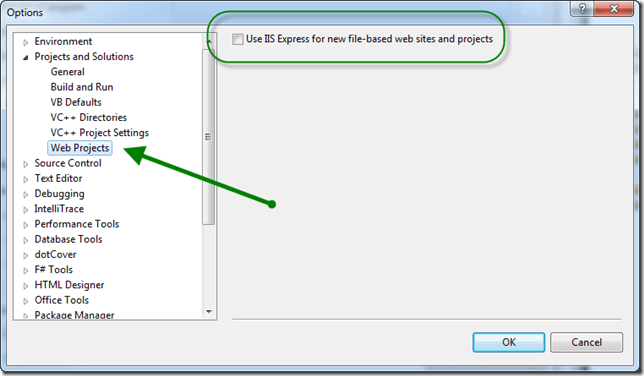
Here’s a quick tip that will help you leave Cassini in the past where it belongs. If you’re using VS2010 SP1, you can configure your IDE so that it will automatically choose IIS Express out of the box for new web sites and projects. There are a lot of good reasons why you should be using IIS Express instead of Cassini / WebDevServer – you can learn more about IIS Express here. Unfortunately, Cassini remains the default web server for new web projects in VS2010 (unless you change it).
To configure an individual web project to use IIS Express after you’ve created it, simply right click on the project in Solution Explorer and choose the Use IIS Express option. You can also configure it in the Web tab of the project’s properties:

That’s great, but it’s annoying to have to do for every new project you create. The good news that it’s pretty easy to make IIS Express the default. Thanks to Damian Edwards for pointing this setting out to me. You can go to Tools-Options-Projects and Solutions-Web Projects and check a box there to make IIS Express the default. Note that this setting will work for web sites as well as web projects, so don’t let the menu’s name throw you off.

Category - Browse all categories

About Ardalis
Software Architect
Steve is an experienced software architect and trainer, focusing on code quality and Domain-Driven Design with .NET.