Fiddler for Firefox

In my tools talk at DevReach earlier this week I mentioned that I use Fiddler with IE and FireBug with Firefox to see HTTP traffic involved in loading and working with a given web page/site.  I said in the talk that Fiddler only works with IE, but that's not entirely true as Ivo Evtimov was kind enough to point out to me.  You can configure Firefox to work with Fiddler, but you have to do so manually each time you want to do it (whereas Fiddler just works with IE, and Firebug just works with FF).

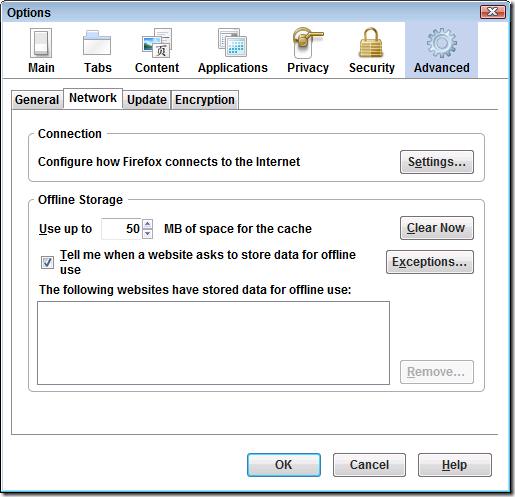
In order to configure FF to work with Fiddler, you have to set it up as a proxy server.  You'll find this under FireFox's options, which in FF3 is under Tools -> Options -> Advanced -> Network.
image

Next go to Settings.

image

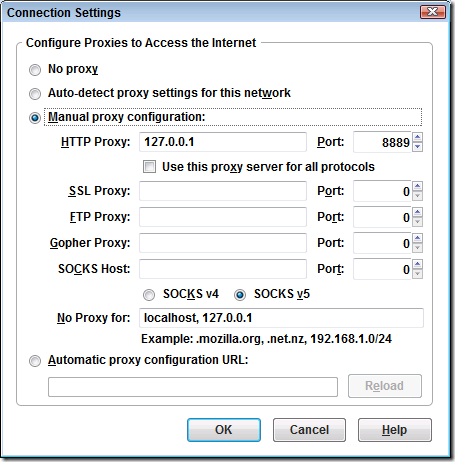
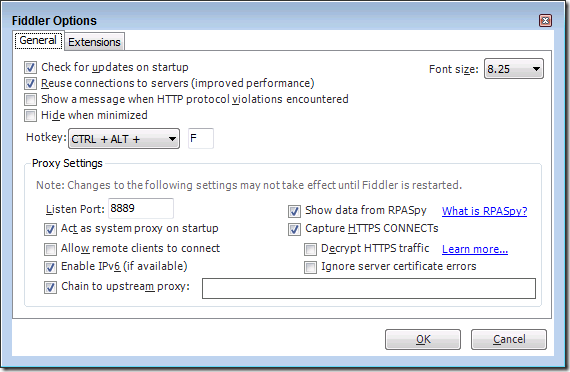
And configure it to use 127.0.0.1 and port 8888 by default.  You can check which port Fiddler is listening on by going to Fiddler's Tools -> Fiddler Options menu and looking at its Listen Port.  I have mine set to 8889 because I have other web sites using 8888.  Just be sure they match.

image

Once you have these set up, you can make requests in FireFox or IE and have all of the traffic captured within Fiddler.  However, when you shut down Fiddler you'll need to manually reset your proxy to No Proxy in FireFox.  Also note that if you're trying to test something on localhost, remove that from the No Proxy For list in FireFox's settings.

Thanks again to Ivo Evtimov for following up on this!

10 Comments

  • Sonu Kapoor said

    I use Firebug with Firefox as well and I would never replace it with fiddler. The fact that I can inspect elements/dom etc.. with firebug works so much easier and is much more robust then what fiddler offers.
    I wish I could use Firebug with IE. The firebug-light version that can be used for IE, just doesnt do it for me.

  • Ben Scheirman said

    IIRC you can use Firefox with Fiddler without jumping through those hoops.
    Try it out placing a '.' after localhost...
    like this:
    <a target="_blank" href="http://localhost.:1234/somePage.aspx">localhost./.../somePage.aspx</a>

  • Luciano Evaristo Guerche (Gorše) said

    Instead, I'd rather use Live HTTP Headers (https://addons.mozilla.org/pt-BR/firefox/addon/3829) and/or HttpFox (https://addons.mozilla.org/pt-BR/firefox/addon/6647)
    --
    Luciano Evaristo Guerche (Gorše)
    Tabo&#227;o da Serra, SP, Brazil

  • Ivo Evtimov said

    There is another option - to use
    autoconfiguration proxy url.
    The autoconfiguration url is file:///c:%5Cdocuments%20and%20settings%5CYOURNAMEHERE%5Cmy%20documents%5CFiddler2%5Cscripts%5Cbrowserpac.js on XP, or file:///c:%5Cusers%5CYOURNAMEHERE%5Cdocuments%5CFiddler2%5Cscripts%5Cbrowserpac.js on Vista.
    For more info on how to congigure Fiddler to work with other apps - <a target="_blank" href="http://www.fiddlertool.com/Fiddler/help/hookup.asp">www.fiddlertool.com/.../hookup.asp</a>
    @Ben Scheirman - the problem is not to capture the local traffic. This is a great solution but of a different problem :)

  • Joe Brinkman said

    The autoconfiguration proxy is what I use although I have had turn off the auto-proxy when I shutdown fiddler as otherwise FF seems to have problems.

  • Eric Lawrence said

    Fiddler &quot;automatically&quot; works with IE, Safari, Chrome, and Opera. Firefox does not support the Windows API for proxy change notifications.
    There's a special section on Firefox here: <a target="_blank" href="http://www.fiddler2.com/fiddler/help/hookup.asp#Q-NonIE">www.fiddler2.com/.../hookup.asp</a>

  • Eric Lawrence said

    @Joe: If you restart Firefox (or click the &quot;Reload&quot; button&quot; on their connection settings screen) then their autoconfiguration code will go reload the browserpac.js file and either attach or detach Fiddler as appropriate.

  • Using Fiddler with Mozilla Firefox said

    Earlier today I read a very interesting blog post from Steve Smith . I use FireBug for all of my debugging purposes in Firefox. I wish that IE had a tool as amazing as FireBug. Sadly, I know of none. I had a similar desire for Firefox, because I use Fiddler

Add a Comment