Determine All SQL Server Table Sizes
Date Published: 27 April 2010

I’m doing some work to migrate and optimize a large-ish (40GB) SQL Server database at the moment. Moving such a database between data centers over the Internet is not without its challenges. In my case, virtually all of the size of the database is the result of one table, which has over 200M rows of data. To determine the size of this table on disk, you can run the sp_Table Size stored procedure, like so:
EXEC sp_spaceused lq_ActivityLogThis results in the following:

Of course this is only showing one table – if you have a lot of tables and need to know which ones are taking up the most space, it would be nice if you could run a query to list all of the tables, perhaps ordered by the space they’re taking up. Thanks to Mitchel Sellers(and Gregg Stark’s CURSOR template) and a tiny bit of my own edits, now you can! Create the stored procedure below and call it to see a listing of all user tables in your database, ordered by their reserved space.
  -- Lists Space Used for all user tables
CREATE PROCEDURE GetAllTableSizes
AS
DECLARE @TableName VARCHAR(100)
DECLARE tableCursor CURSOR FORWARD_ONLY
FOR select [name]
from dbo.sysobjects where  OBJECTPROPERTY(id, N'IsUserTable') = 1
FOR READ ONLY
CREATE TABLE #TempTable(
tableName varchar(100),
numberofRows varchar(100),
reservedSize varchar(50),
dataSize varchar(50),
indexSize varchar(50),
unusedSize varchar(50))

OPEN tableCursor
WHILE (1=1)
BEGIN
  FETCH NEXT FROM tableCursor INTO @TableName
  IF(@@FETCH_STATUS<>0)
    BREAK;
  INSERT  #TempTable
  EXEC sp_spaceused @TableName
END
CLOSE tableCursor
DEALLOCATE tableCursor
UPDATE #TempTable
SET reservedSize = REPLACE(reservedSize, ' KB', '')
SELECT tableName 'Table Name',numberofRows 'Total Rows',reservedSize 'Reserved KB',dataSize 'Data Size',indexSize 'Index Size',unusedSize 'Unused Size'
FROM #TempTableORDER BY CONVERT(bigint,reservedSize) DESC

DROP TABLE #TempTable
GO
Running this results in something like the following (confirming that in my case, lq_ActivityLog is in fact the largest table in my database):

Look for another post soon that details some of the steps I’m taking to reduce the size of this table (and its related Summary tables, shown above).
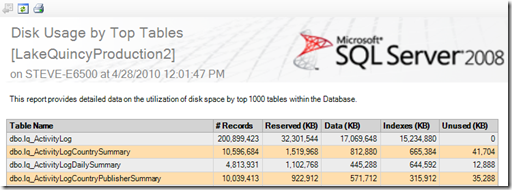
Alternately, assuming you have access, just go into Object Explorer and right click on your database, then select Reports – Standard Reports – Disk Usage by Top Tables. You’ll get something very similar (and a bit prettier):
Tags - Browse all tags
Category - Browse all categories

About Ardalis
Software Architect
Steve is an experienced software architect and trainer, focusing on code quality and Domain-Driven Design with .NET.