Prevent Resharper From Adding Regions
Date Published: 03 February 2010

A couple of days ago I was annoyed that Resharper was insisting on turning my abstract base NUnit test class with nothing in it but a shared [SetUp] method into a one line class with a collapsed Setup / Teardown region in it. While I didn't always feel this way, my experience has taught me that regions are a smell in your code. They are a way to hide things you don't want to deal with or look at. It's kind of like putting makeup over a melanoma instead of having a doctor remove it. Here'sa pretty good analysis of why regions are a code smellif you're interested.
So anyway, I'm using Resharper and am in general a huge fan, and I know I can configure this thing every which way, but I look through the options and nothing jumps out at me about how to adjust Region settings for NUnit tests. I manually removed the region and checked in my code and, rather than spending more time and effort researching a solution, griped about it on twitter today. Not long after, Todd Ropog let me know about this:
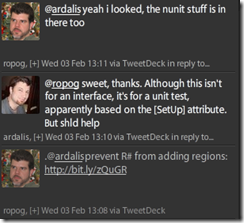
Prevent Resharper from adding Regions to Interfaces
Chris outlines the steps nicely:
- Go to ReSharper | Options
- In the left explorer pane, find Language | C# | Formatting Style | Type Members Layout
- Uncheck "Use Default Patterns"
- A huge nasty XML document appears. As Kyle mentions, Don't Panic.
This is why I never found what I was looking for – if you don't uncheck the “Use Default Patterns” checkbox, you never even see the XML used. Once you see this:

you're pretty much there. All you need to do is look for things that say:
<Group><br /> <Name <span class="attr">Region="Some Region Name"/><br /></Group>and remove them. You can remove the whole
So, to sum up:
- Regions can indicate a code smell and should be used sparingly.
- Resharper is a fabulous tool…
-
- …but it's so darned flexible that finding how to do some things can be hard.
- Twitter can be a great way to get other people to tell you how to do things you don't know how to do.
- Hopefully this helps a few people Googling/Binging or having their friends Tweet how to remove regions from Resharper code cleanup in the future.
Tags - Browse all tags
Category - Browse all categories

About Ardalis
Software Architect
Steve is an experienced software architect and trainer, focusing on code quality and Domain-Driven Design with .NET.